LiDAR-GTA-V: Synthetic LiDAR Point Cloud Generation in GTA V
Overview
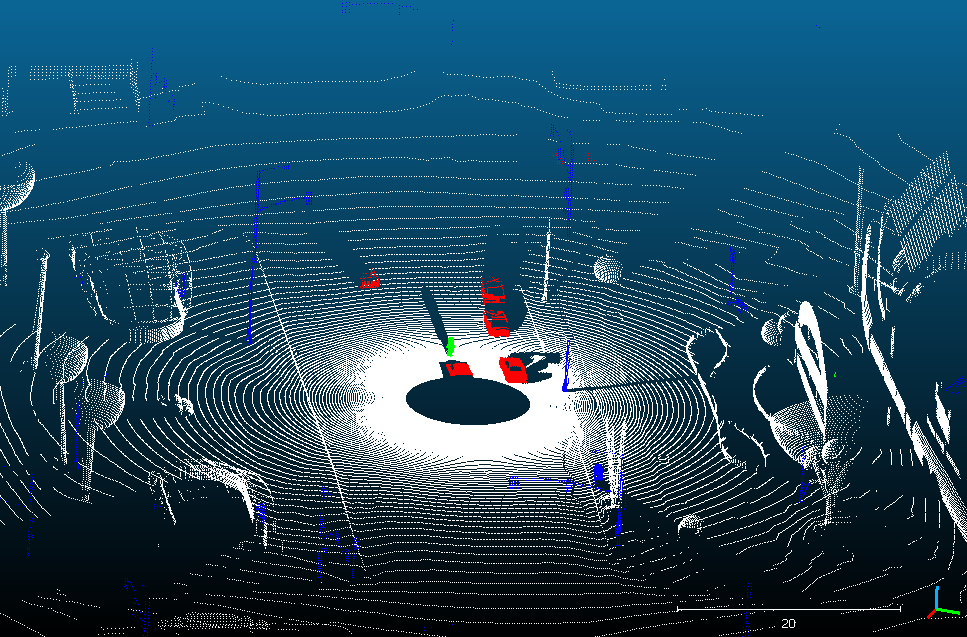
LiDAR-GTA-V is a plugin for Grand Theft Auto V that automatically generates outdoor semantically labeled LiDAR point clouds from the game environment. It is forked from UsmanJafri/LiDAR-GTA-V and extended with the automation feature.
The plugin leverages GTA-V’s rich, photorealistic simulation environment as a source of free, labeled synthetic data for autonomous driving and 3D perception research — a valuable complement to real-world datasets.
Output Format
Each captured frame is saved as a .txt file under #game_directory#/data_set/{index}.txt. Every line in the file represents one point in the point cloud with the following fields:
where $(x, y, z)$ is the 3D position, $(r, g, b)$ encodes the semantic label via vertex color, and $(n_x, n_y, n_z)$ is the surface normal.
Semantic Color Coding
The RGB color channel is used to encode object categories, enabling automatic semantic segmentation of the point cloud:
| Color | Category |
|---|---|
| 🔴 Red | Vehicles |
| 🟢 Green | Humans & Animals |
| 🔵 Blue | Game Props |
| ⚪ White | Roads, Buildings & other hittable textures |
| ⚫ Black | No hit (empty rays) |
Installation
- Install ScriptHookV following its accompanying instructions.
- Install the Autonomous Driving mod and its dependencies to enable automatic vehicle movement.
- Copy
LiDAR GTA V.asiand theLiDAR GTA Vfolder from the latest release into your GTA V installation directory (the folder containingGTAV.exe). - Create a
data_setfolder in your GTA V directory.
How to Use
- Edit the configuration file at
#game_directory#/LiDAR GTA V/LIDAR GTA V.cfgand update the absolute path to this file insidelidar.cpp. - Start GTA V in story mode.
- Press
F6to load the config and begin data collection when ready. - Follow the on-screen notification prompts.
- Collected point clouds will appear under
#game_directory#/data_set/.
Developer Notes
- Requires Visual Studio 2022 or higher with the Desktop development with C++ workload.
- Targets Visual Studio Platform Toolset v143.
- After building, the compiled
.asiplugin is automatically copied toD:\Games\GTAV\. Update the post-build event path in the project settings to match your GTA V installation.
Acknowledgements
This project is based on UsmanJafri/LiDAR-GTA-V. The GTA V native API reference used during development can be found at docs.fivem.net.